

Have you ever walked into a store and been instantly drawn to a bright, dynamic screen showcasing the latest deals? Or maybe you’ve glanced at a massive digital billboard on a highway, displaying ads that change every few seconds.
That’s a digital display board doing its magic, grabbing your attention without a word. Whether it’s a retail store, a corporate office, or a bustling airport, these high-tech wonders are popping up everywhere.
We know the attention spans are shrinking, and static signs just don’t cut it anymore. As per a report, 8/10 customers have entered a store because of digital signage catching their interest.
But what exactly are digital display boards, and how do they work? More importantly, how can they benefit you? Let’s explore everything you need to know about this technology.
What Exactly Are Digital Display Boards?
Digital display boards—sometimes called digital screens or digital information displays—are electronic setups like LCD or LED panels that show everything from ads to updates in real time.
Unlike paper flyers, these boards can be updated instantly. They’re powered by tech that’s easy to manage, making them a hit across industries.
They come in various forms:
- Indoor displays: These are used in malls, offices, and hospitals.
- Outdoor displays: These are digger displays like digital billboards or stadium screens.
- Interactive displays: Touchscreens or kiosks that let users engage with the content.
Types of Digital Display Boards
Digital display boards come in many forms, each built for a different purpose and environment. Here’s a quick breakdown of the most common types you’ll see in businesses today:
1. Indoor Commercial Displays
These are common in retail stores, offices, hospitals, and educational spaces. They help display promotional messages, announcements, and product highlights. You’ll usually see them mounted on walls or placed in high-traffic indoor areas.
2. Outdoor LED Billboards
These are designed for visibility in sunlight and long-distance viewing. You’ll find them along highways, building exteriors, and busy intersections. They’re built to withstand rain, heat, and dust while running dynamic ads.
3. Video Walls
A video wall is a cluster of multiple screens arranged to act as one large display. They’re great for control rooms, stadiums, events, lobbies, and interactive brand experiences.
4. Touchscreen Kiosks
These displays allow users to interact with the screen. They’re common at malls, airports, banks, and self-checkout points. Think of them as the digital version of help desks or service counters.
5. Digital Menu Boards
Popular in restaurants, cafés, and QSR chains. They replace printed menus and make updating daily specials or pricing effortless. Dynamic display also helps improve ordering speed and reduce perceived waiting time.
6. Wayfinding & Directory Boards
These help people navigate large spaces like campuses, corporate buildings, malls, airports, and hospitals. They may be static digital maps or fully interactive touch-based navigation tools.
7. Free-Standing Digital Totems
These standalone screens are placed in entrances, corridors, or public spaces. They feature a slim, modern design and grab attention without requiring wall mounting.
8. Transparent LED Displays
These unique screens allow viewers to see both displayed content and what’s behind the glass. They’re often used in retail storefronts to showcase products with layered visuals.
9. Shelf-Edge Displays
Used mostly in supermarkets and retail stores. These small LED strips sit along shelves to promote offers, pricing, and product information right where buying decisions happen.
Core Components of a Digital Display System
A digital signage setup may look simple from the outside, but there are a few key components working together behind the scenes. Here’s a quick breakdown of what makes the system run smoothly.
- Display: This is the screen your audience sees. Whether it’s an indoor LCD screen, an outdoor LED billboard, a projector for large spaces, or a transparent LED panel for storefronts, the display type depends on where and how it will be used.
- Media Player: Think of this as the engine behind the screen. A media player stores and plays visuals, videos, images, tickers, or live feeds, and sends them to the display in the correct format and at the proper schedule.
- Content Management System (CMS): A CMS makes managing content easy. It lets you upload, organize, schedule, and update screens remotely from a single dashboard. If you need to publish a new promotion across multiple locations, this is where it happens.
- Internet / Connectivity Layer: A stable connection keeps everything synced. Whether it’s Wi-Fi, LAN, or a cellular network, the connectivity layer allows the CMS and media player to communicate, update content, and sync real-time data.
- Mounting System: This includes brackets, stands, enclosures, or wall frames that keep the screen securely positioned. The mounting setup also considers viewing height, angle, safety, and maintenance accessibility.
- Power Management: Power systems ensure the screen operates efficiently and safely. Timers, surge protection, smart on/off scheduling, and energy-saving settings help prolong screen life and reduce electricity consumption.
How Do Digital Display Boards Work?
At their core, digital display boards are a combination of hardware and software. Here’s a closer look:
The Hardware: LED vs. LCD
LED Displays: Made up of tiny light-emitting diodes, these are brighter and more energy-efficient. They’re ideal for outdoor use, like billboards or large public screens.
LCD Displays: These use liquid crystal technology and are better suited for indoor settings, such as retail stores or corporate lobbies.
Both types are powered by media players or controllers that feed them content. Advanced boards may also include features like touchscreens or motion sensors.
The Software: Content Management Systems (CMS) for Digital Signage
This is where it all happens. A CMS allows you to upload, schedule, and manage content remotely. Want to change an ad or display live social media feeds? It’s as simple as a few clicks.
Did you know?
Digital signage with engaging and informational videos, carefully selected advertisements, how-to videos, and customer testimonials can reduce perceived wait times by 35%. (DIgital Signage Today)
How Content Gets Delivered From CMS to Screen (Step-by-Step Flow)
Here’s how content gets delivered from the digital signage CMS to the screen:
1. Create Content Inside the CMS
Everything begins inside the Content Management System. This is where creatives, messages, menus, or promotions are uploaded or designed. With a platform like Acumen CMS, you don’t need design experience, pre-built layouts, templates, and drag-and-drop editing make the process quick and user-friendly.
2. Schedule Playlists
Once the content is ready, the next step is scheduling. You decide when each message plays, morning vs evening menus, weekend promotions, or time-based announcements. A smart CMS automates this, so once schedules are set, you don’t need to touch it again unless plans change.
3. CMS Pushes Data to the Player
After scheduling, the CMS sends the content to the media player attached to each display. This can happen instantly or at a defined sync interval. Platforms like Acumen handle this in the background, ensuring screens receive the right content without manual file transfers or USB drives.
4. Player Renders Content on Screen
The media player now decodes the files and plays them based on the schedule. It ensures smooth playback of videos, images, scrolling text, live data, or interactive touch-based content. A reliable setup prevents freezing, glitches, or black screens, something Acumen CMS is specifically optimized for.
5. Screen Updates on Preset Intervals
Finally, the screen checks for new updates at regular intervals. If there’s fresh content, it’s downloaded and added to the rotation seamlessly. Whether you’re managing one display or hundreds across multiple locations, this automated refresh keeps everything synchronized and consistent.
Digital Display Board Use Cases Across Industries
Digital signage is solving real-world problems. These display boards work in many ways across various sectors to address challenges. Here’s how:
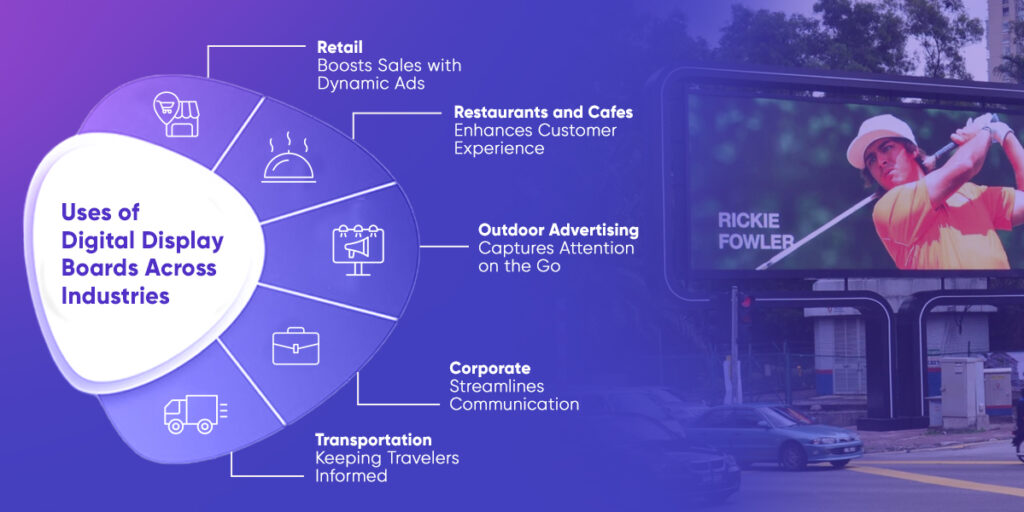
Retail: Boosting Sales with Dynamic Ads
Ever noticed how digital advertising screens in stores highlight flash sales or new arrivals? They’re proven to increase footfall and sales by up to 30%.
Restaurants and Cafes: Enhancing Customer Experience
From digital menus to promotional boards, restaurants and cafes are using digital displays to:
- Showcase daily specials and combo deals.
- Display live social media feeds or customer reviews.
- Reduce perceived wait times with engaging content.
Outdoor Advertising: Capturing Attention on the Go
Digital billboards along highways or city centers are hard to miss. They’re dynamic, eye-catching, and can be updated instantly—no more printing costs!
Corporate: Streamlining Communication
From meeting room schedules to company announcements, digital boards keep employees informed and engaged.
Transportation: Keeping Travelers Informed
Airports and train stations use digital Signage to display real-time schedules, delays, and safety alerts. No more scrambling to find your gate!
What are the benefits of digital display boards?
40% of shoppers say digital signages influence their buying decisions (Digital Signage Today). Switching to digital signage display isn’t just a trend, it’s a smart move. Here’s why:
- Cost-Effective – No recurring printing costs. Update content with a few clicks.
- Engaging – Dynamic content grabs attention better than static signs.
- Flexible – Change messages based on time, audience, or location.
- Eco-Friendly – Reduce paper waste and energy consumption with modern displays
- Real-Time Updates – Display live data like weather, news, or social media feeds.
- Increased Revenue – Businesses report up to 33% higher sales with digital signage
- Improved Customer Experience – Reduce wait times and enhance engagement.
Digital Signages have innumerable benefits for all businesses, provided they display relevant content across these screens. Content management systems play a big role in ensuring that businesses get the maximum ROI from the digital boards.

A Quick Guide on How to Use Digital Signage Effectively
Want to make the most of your digital display boards? Here are some tips:
- Define Your Goal: Are you informing, advertising, or entertaining?
- Choose the Right Location: High-traffic areas work best.
- Keep Content Fresh: Rotate ads, videos, and messages to maintain interest.
- Go Interactive: Use touchscreens or QR codes for a personalized experience.
Pro Tip: Use bold colors and short, impactful messages to grab attention quickly.
When Should a Business Switch to Digital Display Boards?
Here’s when a business should switch to the digital display boards:
1. Frequent Content Changes
If you update menus, schedules, offers, or announcements often, printed signage becomes slow and expensive to keep up with. Digital screens let you update content instantly, whether it’s a price change, a seasonal promo, or a last-minute business update.
2. High Foot Traffic
Places with constant movement, such as stores, airports, hospitals, and gyms, need messaging that grabs attention quickly. Motion, video, and bright visuals on a digital display do that far better than posters or banners people have learned to ignore.
3. Need for Bilingual Content
If you serve a diverse audience, switching between languages on a printed sign is nearly impossible without clutter. Digital displays solve this; you can switch languages automatically or display them side-by-side without compromising design or space.
4. Wanting More Customer Engagement
If you want to show videos, promos, menus, live feeds, reviews, or interactive tools, screens give you more room to connect in real time. Even a simple motion or animation increases engagement significantly compared to printed signage.
5. Need for Consistent Branding
Brand consistency becomes tricky when different stores print materials locally. With digital display boards managed through a single central system, every location automatically follows the same visual style, tone, logo usage, and messaging.
6. Managing Multiple Locations
If your business operates across branches or franchises, digital signage simplifies communication. Instead of sending files or print orders to many locations, you update everything from one place. Using a platform like Acumen makes nationwide or multi-branch updates effortless and error-free.
Checklist to Choose the Right Digital Display Board
Choosing the right digital display board can feel overwhelming, but it doesn’t have to be. Here’s a simple checklist to guide you:
| Factor | What to Consider |
| Indoor Usage | Opt for standard brightness and sleek designs that blend with your interior. |
| Outdoor Advertising | Should have high brightness for visibility in sunlight, and should be weatherproof and durable. |
| Screen Size | Choose based on viewing distance—bigger isn’t always better. |
| Resolution | Opt for HD or 4K for crisp, clear visuals. |
| CMS Compatibility | Ensure the board works well with the content management system, without glitches |
| Budget | Balance cost with features and longevity |
| Interactivity | Consider touchscreens or motion sensors for a more engaging experience |
Common Myths About Digital Display Boards
Digital signage has grown quickly, but a few assumptions still hold businesses back from taking the next step. Let’s clear up the most common ones.
Myth 1: Digital display boards are too expensive
Many assume digital signage means a substantial upfront investment. The reality is that costs have dropped significantly over the last few years, and most businesses save more in the long term by eliminating printing, installation, and the constant reordering of physical signage.
Myth 2: They require technical expertise
You don’t need IT knowledge or design training to manage content on a display. Modern systems are built for non-technical users: upload a file, drag and drop, and schedule.
Platforms like Acumen CMS make updates simple enough to handle in minutes, whether you’re updating one screen or many.
Myth 3: They consume too much electricity
Older LED and LCD panels may have had high power usage, but today’s screens are energy-efficient, optimized for long hours of operation, and can run on automated brightness control. Features like scheduled on/off times and power-saving modes keep running costs predictable and low.
Myth 4: Only large businesses need digital signage
Cafés, clinics, gyms, salons, schools, and single-location stores use digital signage to advertise offers, communicate updates, and improve the customer journey. If you need to share information visually, the size of your business doesn’t matter.
Myth 5: They require constant internet
A stable connection helps with remote updates, but the screen doesn’t need to stay online every second. Once content is downloaded to the media player, it keeps running smoothly, even offline. When the system reconnects, updates sync automatically. With solutions like Acumen, this process happens quietly in the background.
How Acumen CMS Gets You Maximum ROI Out of Your Digital Signage
Acumen CMS is your go-to for digital signage that delivers. It’s cloud-powered, letting you manage digital display boards from anywhere—upload a creative, hit play, and boom, it’s live across your screens in under a minute.
This digital signage software has all that you need in a comprehensive digital signage solution.
Digital display boards are a smart way to connect, inform, and sell. They’re reshaping how businesses talk to us. And Acumen CMS helps them communicate in the best way possible.
Acumen CMS helps you to:
- Engage your audience with dynamic, eye-catching content.
- Simplify content management with remote updates and scheduling.
- Scale effortlessly, whether you’re managing 10 screens or 100.
With all its advanced features at an affordable rate, it is something you can’t miss if you want your business to thrive in today’s digitally advanced business environment. Schedule a call with Acumen CMS today.
Frequently Asked Questions
What’s the difference between LED and LCD displays?
LED displays are brighter and more energy-efficient, making them ideal for outdoor use like billboards or stadium screens. On the other hand, LCD displays are cost-effective and better suited for indoor settings such as retail stores or offices.
Can I use digital display boards for live updates?
Yes, you can! With a CMS like Acumen, you can display real-time data such as weather updates, news feeds, social media posts, or even live event schedules, keeping your audience informed and engaged.
How much do digital display boards cost?
The cost of digital display boards varies depending on factors like size, resolution, and features. However, they are a long-term investment with minimal maintenance costs compared to traditional signage, making them a cost-effective choice for businesses.
Are digital display boards eco-friendly?
Absolutely! Digital display boards reduce paper waste and energy consumption, making them a sustainable and environmentally friendly option for modern businesses looking to go green.
How does Acumen CMS make managing digital signage easier?
Acumen CMS simplifies digital signage management by offering remote content updates, advanced scheduling, detailed analytics, and seamless scalability. Whether you’re managing 10 screens or 100, Acumen CMS ensures your content is always fresh, engaging, and impactful.